English
 Español
 Deutsch
 日本語
日本語 Polska
 Français
 한국의
한국의 Українська
 Italiano
 Nederlands
 Türkçe
 Português
 Bahasa Indonesia
 Русский
 हिंदी
हिंदी
















脚本 VRayMaterialsv2 3D 模型
- 请求作者的产品支持


- 可用的格式:
- 项目 ID:616481
- 日期: 2025-12-08
- 动画:
- 纹理:No
- 操纵:No
- 材料:No
- 低聚:No
- 集合:No
- UVW 贴图:No
- 使用插件:
- 打印准备:No
- 3D扫描:No
- 成人内容:No
- PBR:No
- 人工智能培训:No
- 几何:Polygonal
- 包装 UVs:Unknown
- 日期:47
描述
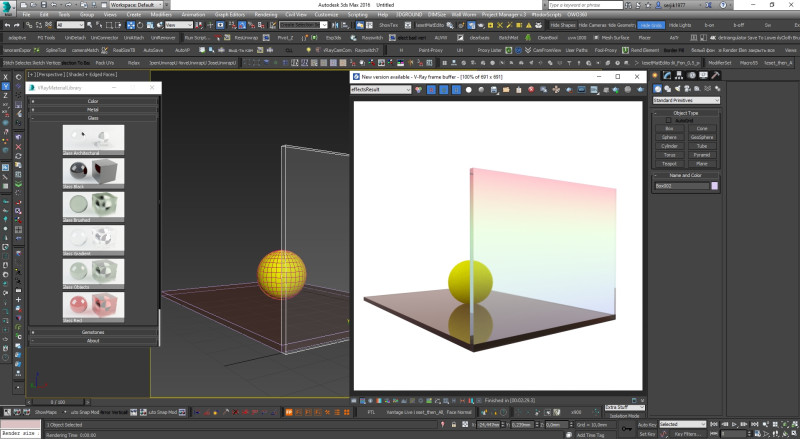
✅ Step-by-Step Guide: Installing VRayMaterials_v2 in 3ds Max 1. Launch 3ds Max
Open the 3ds Max program normally.
2. Install the MZP script files
You have two archives:
VRayMaterials_v2_run-FIRST.mzp → install this first
VRayMaterials_v2-SECOND.mzp → install this second
To install each:
Drag the .mzp file into the 3ds Max viewport.
Confirm the installation dialog if it appears.
Wait for installation to finish.
Then install the second archive the same way.
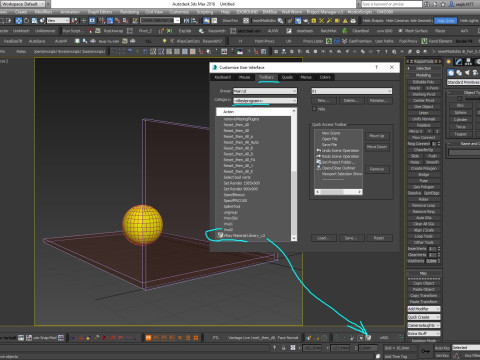
3. Add the toolbar button
Go to the top menu:
Customize → Customize User Interface…Open the Toolbars tab.
In the dropdown Group, select:
Main UIIn the list Category, select:
– = Bestprogram = –In the Actions list, find the item:
VRay Material Library_v2Drag this action onto any toolbar to create a new button.
You should now see a new button named:
打印准备: 否需要更多的格式吗?
如果你需要一个不同的格式,请打开一个新的支持票和为此请求。我们可以转换到 3D 模型: .stl, .c4d, .obj, .fbx, .ma/.mb, .3ds, .3dm, .dxf/.dwg, .max. .blend, .skp, .glb. 免费格式转换我们不转换 3d 场景 以及 .step, .iges, .stp, .sldprt 等格式。!
使用信息
脚本 VRayMaterialsv2 - 您可以根据基本许可或扩展许可,将此免版税 3D 模型用于个人或商业用途。基本许可涵盖大多数标准用例,包括数字广告、设计和可视化项目、商业社交媒体账户、原生应用、Web 应用、视频游戏以及实体或数字最终产品(免费和出售)。
扩展许可包含基本许可授予的所有权利,没有任何使用限制,并允许在免版税条款下将 3D 模型用于无限的商业项目。
阅读更多