


 Español
 Deutsch
 日本語
日本語 Polska
 Français
 한국의
한국의 Українська
 Italiano
 Nederlands
 Türkçe
 Português
 Bahasa Indonesia
 Русский
 中國
中國 हिंदी
हिंदी
















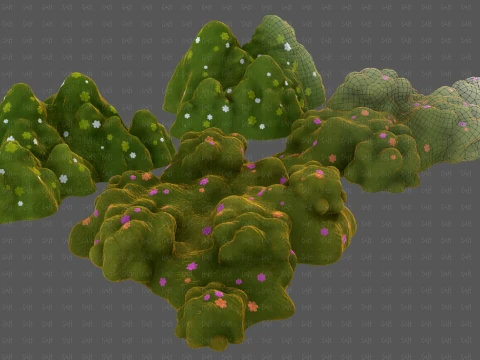
grass 3D Models
We have 4835 item(s) Royalty free grass 3D Models. Buy or download free 3D models for your CG projects, film and video production, animation, visualizations, games, VR/AR, and others. You can download any 3d model in all popular 3d formats including MAX, OBJ, FBX, 3DS, STL, C4D, BLEND, MAYA
 AltruistGrass and Ground Cover
- -20%
 3dgardenplantsTree
 - -20%
 3dgardenplantsGrass and Ground Cover
 - -20%
 3dgardenplantsGrass and Ground Cover
 - -20%
 3dgardenplantsGrass and Ground Cover
 - -20%
 3dgardenplantsGrass and Ground Cover
 - -20%
 3dgardenplantsGrass and Ground Cover
 - -20%
 3dgardenplantsGrass and Ground Cover
 - -20%
 3dgardenplantsGrass and Ground Cover
 - -20%
 3dgardenplantsGrass and Ground Cover$71.20
$89.00 - -20%
 3dgardenplantsGrass and Ground Cover
 - -20%
 3dgardenplantsGrass and Ground Cover
 - -20%
 3dgardenplantsGrass and Ground Cover
 - -20%
 3dgardenplantsGrass and Ground Cover
 - -50%
 deckoratorFlowers




































Trending searches 3D Models:
Sculpture 3D Models Characters 3D Models Kitchen 3D Models Horse 3D Models Architectural Exteriors 3D Models Phone and Cell Phone 3D Models Vegetable 3D Models Jewellery 3D Models Toys 3D Models Medical 3D Models Helicopter 3D Models Heavy Weapon 3D Models Truck 3D Models Anatomy 3D ModelsQ1: What techniques are used to create realistic grass 3D models?
Four approaches, each suited to different use cases. Geometry grass: actual polygon blades, expensive but highest quality at close range. Alpha card grass: flat planes with grass texture and alpha cutout — the standard for game environments, balancing visual quality with performance. Mesh+texture hybrid: small geometry tufts with surrounding alpha cards to add density. Procedural grass: generated at runtime through engine systems (Unreal's Procedural Foliage, Unity's Terrain detail system) from a small base mesh. For archviz close-up renders in Blender, geometry grass at 5–10cm blade height with wind simulation is the quality target. For real-time games, alpha card patches at 1,000–3,000 tris per cluster, scattered with density variation for natural appearance.
Q2: How do I set up a grass wind animation for an outdoor scene?
In Blender, the easiest approach uses a Wave modifier on a plane of grass geometry — set wave speed (0.5–1.0 for gentle breeze), scale (0.1–0.3 for blade deflection), and add slight turbulence to break up the mechanical regularity. For more realistic wind, use a Force Field object set to Wind type — position it off-camera and use the Turbulence modifier on the force field to create gusting behavior. Hair particle grass responds to force fields directly. For game engines, UE5's Wind Directional Source actor drives Foliage Wind shaders on grass assets — most commercial grass packs include a wind material already set up. In Unity, the Terrain system's grass detail objects support a built-in wind zone component.
Q3: What PBR texture set does a realistic grass model need?
Five maps for full quality. Diffuse/albedo: the grass color — not uniformly green, but a mix of yellow-green for younger blades, darker green for mature blades, and brown tips for natural variation. Normal map: blade curvature and surface micro-detail. Roughness: grass is matte, 0.7–0.85 roughness range. Translucency/subsurface: grass blades are backlit by sunlight — a transmission or translucency map makes light pass through thin blades convincingly, which is the detail that separates grass renders from plastic-looking geometry. Alpha: for card-based grass, a clean cutout map with soft edges for anti-aliasing. Without the translucency map specifically, grass looks opaque and plastic under direct sunlight.
Q4: What performance optimization is needed for grass in real-time game environments?
Grass is one of the most performance-intensive elements in outdoor game environments — managing it poorly can halve your frame rate. The key optimizations: LOD with aggressive polygon reduction at 10+ meter distances (alpha cards at far distance, simpler geometry nearby); distance culling so grass beyond 50–80 meters isn't rendered at all; GPU instancing so thousands of grass clumps are drawn in a single draw call rather than individually; and frustum culling (don't render grass behind the camera). In Unreal Engine 5, the Procedural Foliage Volume combined with a LOD-optimized grass mesh handles all of these automatically. The grass mesh itself should have a simple box collision rather than per-polygon — character collision against actual grass geometry collapses frame rates on any hardware.